
Introduction
To make a modern digital experience come to life, multiple platforms need to be connected. The real power of a digital experience platform isn't what it can do alone; it’s what it can do when everything around it is connected. A contemporary Sitecore implementation does not live in isolation. The digital experience consists of more than just your CMS. CRMs store customer data, DAMs store digital assets, commerce platforms store transactions, and marketing and analytics tools store insights. Getting all these systems to function together perfectly is the real challenge.
Integration is not just a technology requirement anymore, but it is fundamental for delivering connected digital experiences. And this is where Sitecore Connect comes into the picture. For businesses using composable architectures and AI-powered experiences, Sitecore Connect helps streamline enterprise integrations and support Sitecore workflow automation across connected systems. You will learn how Sitecore Connect functions, its key features and capabilities, its core components, use cases, how to create an Integration Workflow, and how it is transforming digital experience integrations in this blog.
What Is Sitecore Connect?
Sitecore Connect is a low-code/no-code integration workbench that helps you automate data, workflows, and business processes to provide seamless digital experiences by connecting Sitecore products with other apps throughout your digital ecosystem.
Sitecore Connect is built on Workato. It automates processes based on triggers and actions by connecting apps and Sitecore recipes using Sitecore connectors. Additionally, it offers a visual canvas for data mapping, triggers, actions, customizable data transfer choices, and monitoring features to make enterprise integrations easier.
Sitecore Connect Features and Capabilities
Maximum Connectivity | Integrate Sitecore products with thousands of applications while minimizing the complexity of authentication, data formats, and connection methods. |
Workflow Automation | Automate data and business processes using an intuitive visual canvas with drag-and-drop workflow blocks, conditions, repeat actions, and integrations. |
Flexible Data Transfer | Initiate data communication through system triggers, periodic schedules, webhooks, external APIs, and Slack bots. |
Smart Data Mapping | Use intelligent data-mapping suggestions combined with drag-and-drop manual field mapping when required. |
Active Control Dashboards | Monitor projects and recipes through dashboards to identify and resolve integration issues before they affect operations. |
Task Capacity | Support different task capacities for non-production and production environments, with current documented limits of 50,000 tasks/month for non-production and up to 3 million tasks/year per active production connection. |
Sitecore Connect Core Components
Sitecore Connect is available through the Sitecore Cloud Portal and uses a modular architecture powered by Workato. It primarily works through two core components:
Sitecore Connectors: Connect Sitecore with external applications and enable data exchange between systems.
Sitecore Recipes: Define automated workflows using triggers and actions to move data and perform tasks across connected applications.
Together, Sitecore connectors and recipes help organizations build and automate connected digital systems with minimal development effort.
Building an Integration Workflow in Sitecore Connect
Sitecore Connect works by organizing integrations into projects and recipes. A project acts as a central place for integration assets, while a recipe defines the workflow, including its trigger, actions, connections, and data mapping.
Create a Project
Open Sitecore Connect from the Sitecore Cloud Portal and go to Projects. Create a new project and enter a project name.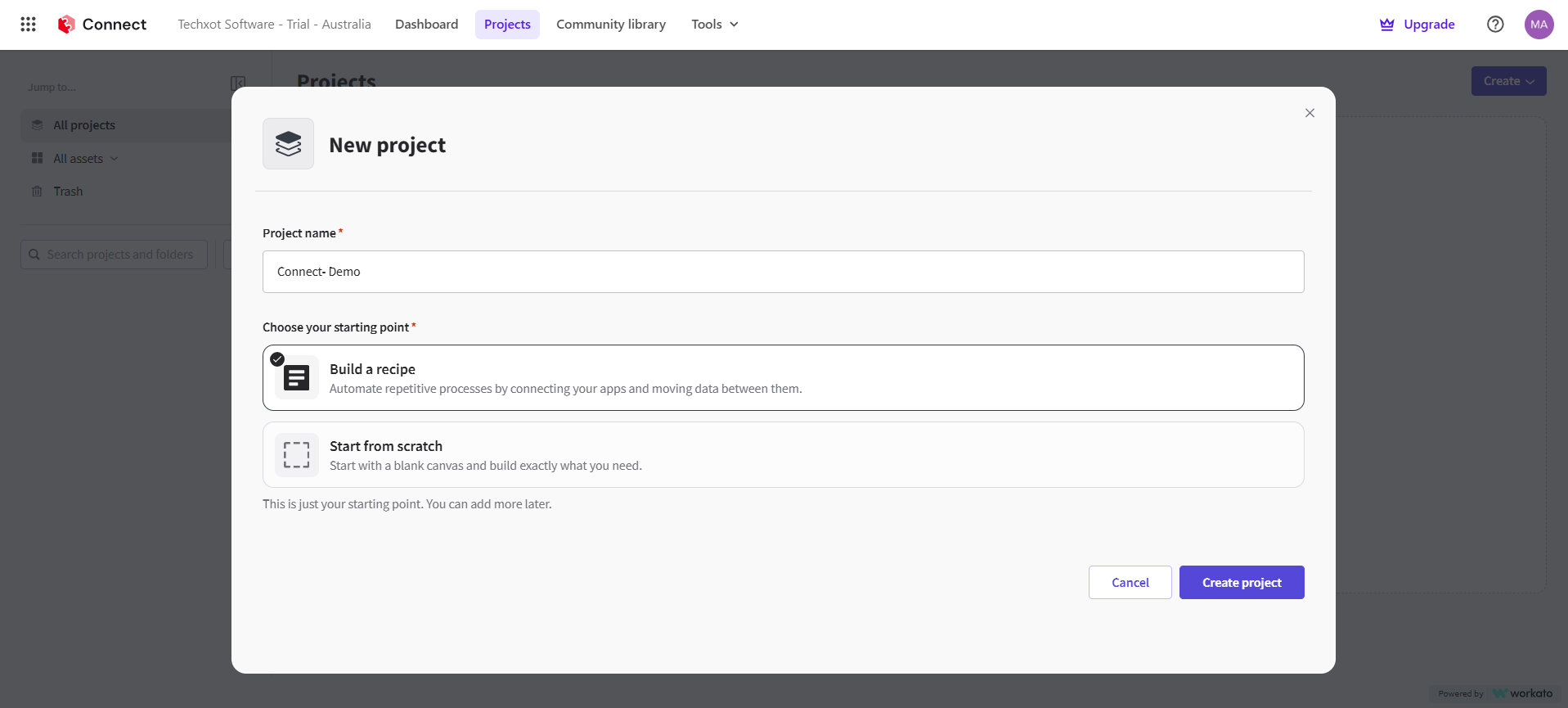
Create a Recipe
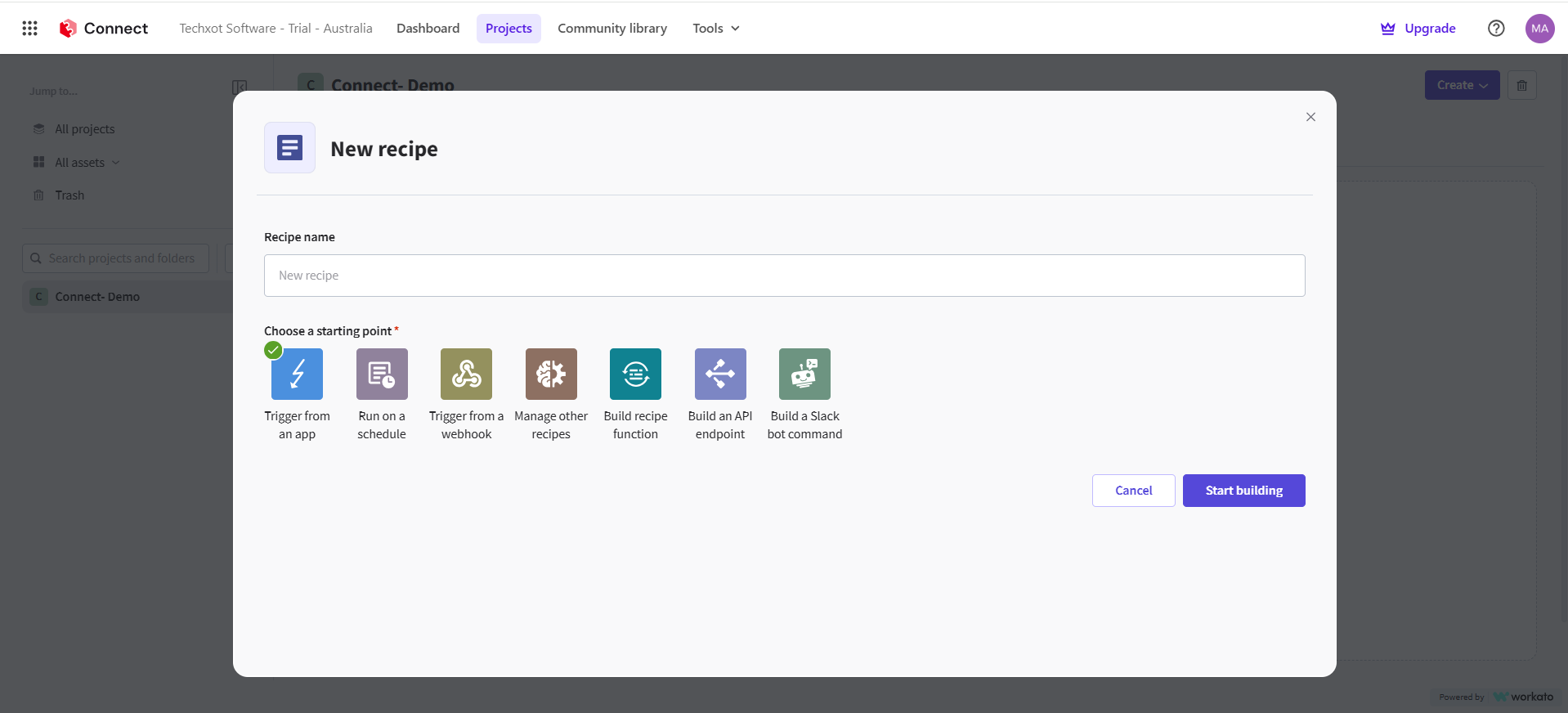
Open the project and select Create > Recipe. Enter a recipe name and choose how the recipe should start.
Choose the Trigger
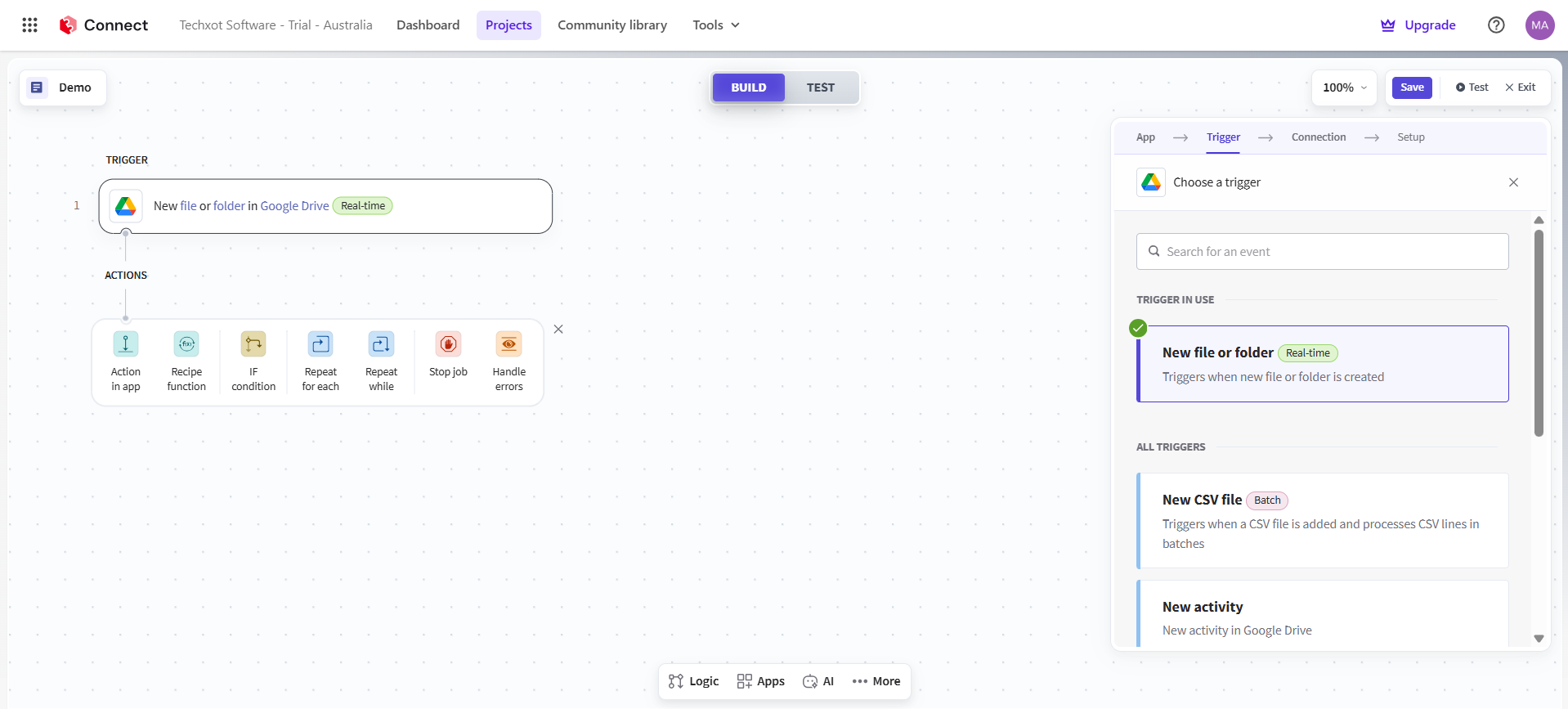
Select the application and the event that should start the workflow.
Configure the Connection
Select an existing connection or create a new one.
Configure the Trigger Setup
Complete the required setup fields for the selected trigger.
Add an Action
Under Actions, select Action in an app, choose the application, and define what it should do.
Map the Data
Use Recipe data/data pills to map information from the trigger or previous steps into the fields required by the action.
Save, Test, and Start the Recipe
Save the recipe, test the workflow, and start it once it is ready. Active recipes can then be monitored.
How Sitecore Connect Is Transforming Digital Experience Integrations
Sitecore Connect helps businesses integrate systems, automate processes, and connect data across their technology stack, combining different platforms into a more unified digital experience environment.
Connecting Composable Technology Stacks
Composable architectures give organizations the freedom to choose specialized platforms for different business needs. But every additional platform introduces another integration point.Sitecore Connect integrations help bridge these systems, allowing Sitecore products to work alongside the wider enterprise technology stack. This is especially important as businesses move from standalone platforms toward more integrated digital ecosystems.
Reducing Manual Processes
Organizations can automate appropriate operations rather than manually transferring data between systems regularly.
To reduce repetitive work and assist teams in maintaining more consistent processes, a task can be to move data from one application to another following a specific event.Connecting Data with Experiences
Digital experience platforms become more valuable when content, customer data, assets, and business information can work together.
Sitecore Connect helps create these connections so information can move between Sitecore and external applications as part of defined workflows.
Supporting Faster Integration Development
Teams can avoid treating each integration as a brand-new development project by using pre-built connections and reused recipes.
Additionally, Sitecore offers built-in connectors that are meant to provide functionality right out of the box while yet being configurable and maintainable.
Sitecore Connect Use Cases
Sitecore Connect can support a range of Sitecore-to-third-party integration scenarios.
CRM & Marketing Integration
Connect Sitecore with CRM and marketing platforms to automate customer and subscriber data flows. For example, Sitecore Send can work with platforms such as Salesforce to automate subscriber management and marketing activities.
Content & Digital Asset Workflows
Connect Sitecore with content management and digital asset platforms to create, update, synchronize, migrate, or distribute content and media across systems.
Marketing Automation
Automate marketing activities by connecting Sitecore with applications such as Facebook, Google Sheets, and other third-party platforms. Workflows can generate leads, manage subscribers, and automatically transfer data.Customer Data & Audience Activation
Connect Sitecore CDP with external platforms to export audience data, upload guest or order records, and activate specific customer segments across marketing and advertising systems.Content & Data Synchronization
Synchronize content and relevant data between Sitecore and external applications based on defined workflows. For example, the SitecoreAI connector can sync content between SitecoreAI and third-party content management systems and support media asset migration and distribution across platforms.API-Driven Integrations
For advanced integration scenarios, Sitecore Connect supports API-based workflows, allowing Sitecore recipes to be exposed and used as APIs with capabilities such as rate limits, quotas, and API management.
Sitecore Connect vs. APIs and Webhooks
APIs and webhooks handle communication between systems, while Sitecore Connect takes integration a step further by adding workflow automation and orchestration. It brings together triggers, actions, data mapping, and business logic to automate Sitecore third-party integrations through recipes.
This makes Sitecore Connect especially useful when the requirement goes beyond simply moving data from one system to another and instead involves automating a series of actions across the connected digital ecosystem.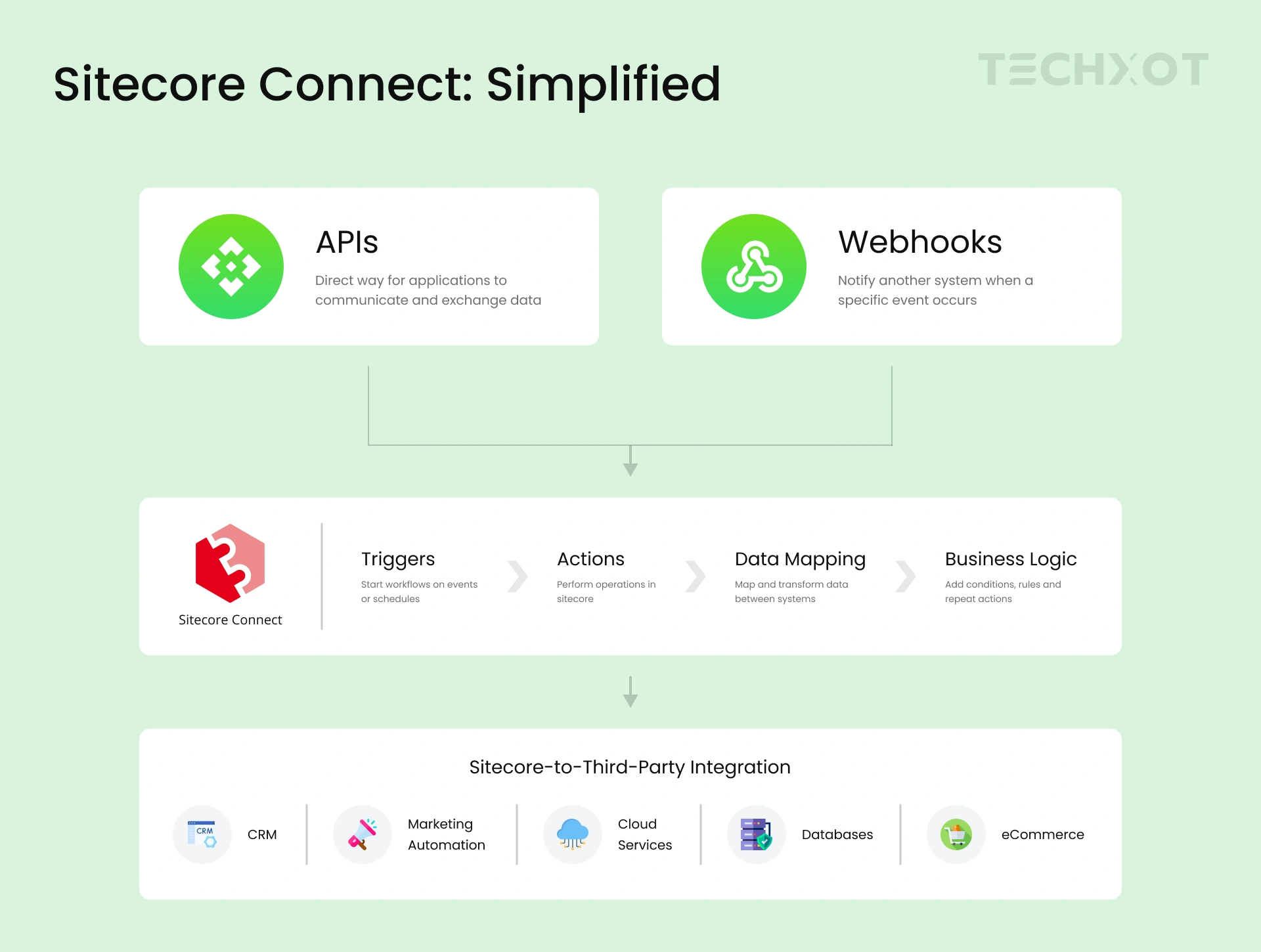
How Techxot Helps Modern Enterprises with Sitecore Connect
With the increasing demand and enterprises adopting AI, composable architectures, cloud platforms, and connected digital experiences, integrating the systems around Sitecore has become truly important. Sitecore Connect helps businesses connect data, automate workflows, and collaborate on interactions across their digital ecosystem.
At Techxot, we help organizations make the most of Sitecore Connect by bringing together Sitecore integration, implementation, modernization, and digital experience engineering expertise. We focus on the right architecture, data flow, automation strategy, and business requirements to build connected and scalable Sitecore ecosystems.
Conclusion
From the above-outlined article, we can clearly state that Sitecore helps simplify enterprise integrations, reduce manual efforts, improve data flow, and create connected digital experiences. Sitecore Connect offers a practical and scalable approach.
At Techxot, we help organizations turn these integration capabilities into connected, scalable, and business-focused Sitecore solutions. As a Sitecore Silver Partner and Reseller Partner, Techxot brings Sitecore implementation, integration, modernization, and digital experience expertise to help organizations maximize their Sitecore investments.