
Introduction
The new age digital experience platforms heavily rely on real-time customer data, personalization, and seamless integration with multiple applications. In the Sitecore environments there are particularly two tools Cloud SDK and Engage SDK that enable all these capabilities for enterprise teams.
Both the SDKs strongly support event tracking, user data collection, and personalization, and both serve different architectures and implementation strategies and purposes. When designing scalable digital experiences working with SDKs, it is important for the architects to understand the working of SDK and when to use it.
This blog walks you through the introduction, application, difference, implementation and architectural considerations for both Cloud SDK and Engage SDK.
Both the SDKs strongly support event tracking, user data collection, and personalization, and both serve different architectures and implementation strategies and purposes. When designing scalable digital experiences working with SDKs, it is important for the architects to understand the working of SDK and when to use it.
This blog walks you through the introduction, application, difference, implementation and architectural considerations for both Cloud SDK and Engage SDK.
Role of SDKs in Sitecore Environment
SDKs that are Software Development Kits help developers deploy applications in the Sitecore digital experience ecosystem.
The modern digital ecosystems with composable architectures, mobile apps, websites, and digital platforms must:
Track user behavior
Record events and send to CDP
Trigger personalization rules
Deliver contextual experiences
SDKs are the communication layer between the front-end application and Sitecore CDP and Personalize.
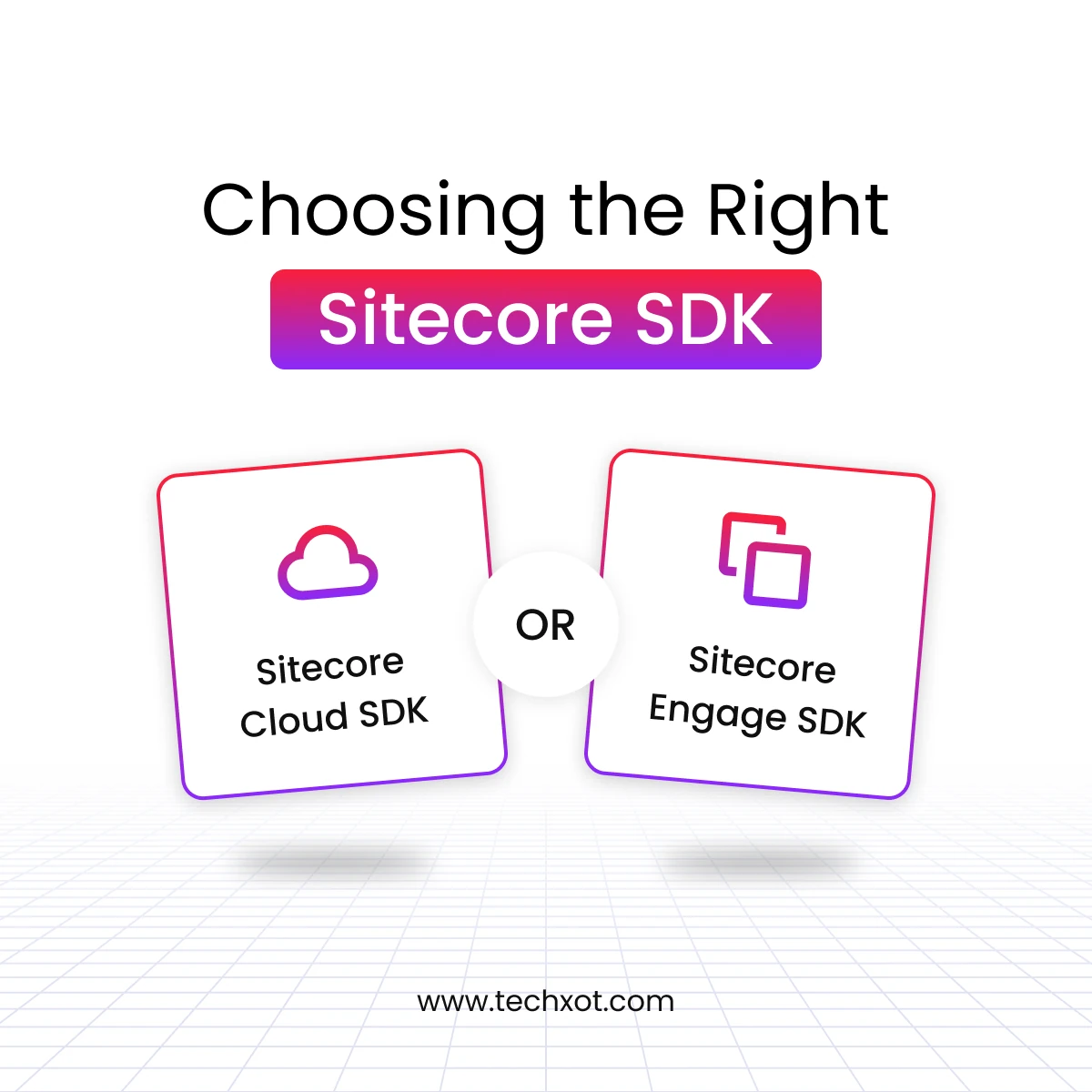
There are two SDK options available to work with:
Cloud SDK
Engage SDK
Both these SDKs collect customer interactions, but Cloud SDK and Engage SDK both are designed for different deployment models and architectures in digital experience ecosystems.
Both these SDKs collect customer interactions, but Cloud SDK and Engage SDK both are designed for different deployment models and architectures in digital experience ecosystems.
What is Sitecore Cloud SDK?
The Sitecore Cloud SDK is specially designed for modern composable architecture environments when using XM Cloud and headless front-end frameworks.
Cloud SDK is the integration layer between Sitecore cloud services and front-end applications
The key capabilities of Cloud SDK:
Tracking user interactions
Collect and send behavioral data
Enable real-time personalization
Integrate with multiple Sitecore Services
Support experimentation and analytics
The Cloud SDK is the perfect choice for the enterprises that work with a full stack of Sitecore composable architectures.
Sitecore Cloud SDK is compatible with following technologies like:
Next.js
React
Sitecore JSS
Headless front-end application
The Cloud SDK’s integration with Sitecore services ecosystem enables enterprise organizations to create unified digital experience pipelines where content, data and personalization work together seamlessly.

What is Sitecore Engage SDK?
The Sitecore Engage SDK is an ideal choice for enterprises that use just the Sitecore engagement capabilities and not the full Sitecore platform.
Engage SDK allows websites and application to connect to:
Sitecore CDP
Sitecore Personalize
Why does it matter?
Because Engage SDK allows enterprise teams to collect customer data and deliver personalized experience without Sitecore being their primary CMS or digital platform.
Engage SDK is well supported in multiple environment ecosystems like:
Next.js
React
Traditional JavaScript websites
Platforms that use tag managers
Thus, Engage SDK is best suited for organizations that wish to use Sitecore engagement tools incrementally with full platform migration.

What Are the Applications of Cloud SDK?
Sitecore Cloud SDK may have a variety of applications, but it is primarily used in modern composable DXPs.
Following are some of the important applications of Cloud SDK:
1. Headless website tracking
When an enterprise team builds the website on headless frameworks like Next.js where the presentation layer is separated from content management layer, the Cloud SDK collects the user interaction and sends it to Sitecore Customer Data Platform (CDP).
2. Omnichannel Experience Delivery
Enterprises track and collect the behavioral data from multiple digital channels and deliver consistent personalized experience to every visitor at every touch point.
3. Experimentation and Personalize
The Sitecore Cloud SDK supports experimentation and personalization by enabling teams to A/B test multivariate experiments to choose the one that works best, imply real-time personalization rules to set triggers.
4. Sitecore cloud services integration
Cloud SDK seamlessly integrates with Sitecore services like content management, customer data, personalization engines, and search capabilities. This unified integration allows organizations to build data-driven digital experiences across customer journeys.

What are the Applications of Sitecore Engage SDK?
The Engage SDK is primarily used is flexible engagement layer deployment and has following applications:
1. Non-Sitecore Website Personalization
Sitecore Engage SDK allows enterprises using CMS other than Sitecore to seamlessly integrate with Sitecore CDP and Sitecore Personalize.
2. Hybrid Digital Architectures
There are enterprises that run more than one CMS across different business units, Engage SDK allows user data collection and personalization without forcing the complete platform consolidation.
3. Event Tracking across Application
Engage SDK allows applications to track and record events such as page views, form submission, purchases, and customer interactions. All these events are fed to CDP and allow marketers to build unified customer profiles.
4. Incremental DXP Adoption
Engage SDK enables enterprises to use customer data and personalization capabilities before they even have the full DXP platform purchased. This helps enterprises to gradually adopt the full DXP as and when needed.
What is the Key Difference between Cloud SDK and Engage SDK?
Aspect | Cloud SDK | Engage SDK |
Architecture | Supports modern headless Sitecore architecture | Seamless integration with any web platform |
Technology Stack | Supports JSS, Next.js and headless frameworks | Supports React, Next.js, JavaScript and tag managers |
CMS Requirement | Works with Sitecore CMS environments | Works with non-Sitecore CMS platforms too |
Purpose | Designed for full composable Sitecore environments | Designed for engagement integrations with CDP and personalize |
Personalization Support | Supports both XM Cloud and Sitecore Personalize experiences | Supports only Sitecore Personalize experiences |
Event Tracking | Tracks behavioral events across Sitecore ecosystems | Tracks events only for CDP data collection |
Experimentation | Supports experiments through XM Cloud | Supports experiments through Sitecore Personalize |
Deployment Environments | Supports only cloud-native Sitecore implementations | Supports both traditional and cloud-native implementations |
Use Case Focus | Best suited for full stack of DXP | Best suited for engagement layer integration |
Ideal Users | Sitecore developers and architects working with XM Cloud | Teams fetching CDP and personalization without platform migration |
Implementation Approach of Software Development Kit (SDK)
When implementing SDKs, it requires architectural planning.
Implementation Approach for Cloud SDK
Implementing Sitecore Cloud SDK involves setups like:
Integrating front-end application and the SDK
Configuration of event tracking for visitor interactions
Connecting SDK to Sitecore cloud services
Setting experimentation and personalization rules
The developer prefers integrating the SDKs in headless front-end frameworks like Next.js which enables seamless data flow between the application and Sitecore services.

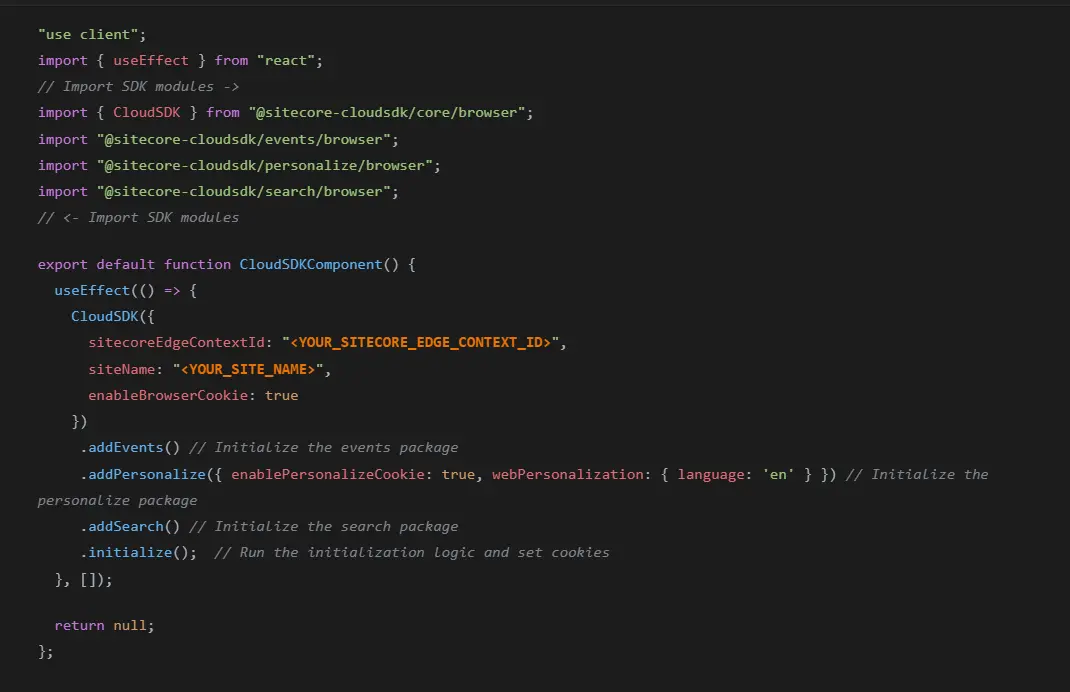
Let’s Get a Quick Overview on Running the Cloud SDK Function
This React component runs only on the client when they open the webpage. This code initializes the Cloud SDK and helps connect to websites which have Sitecore cloud services. The site then passes the site’s context ID and names to Sitecore to recognize the applications. Then event tracking is enabled to record user interactions. After this personalization is activated to deliver customized experiences to deliver content based on behavioral data. Post few feature integrations the Sitecore Cloud SDK setup is complete, and the cookies that are needed for tracking are enabled.
Implementation Approach for Engage SDK
Implementing Sitecore Engage SDK is less complex and more flexible.
Engage SDK may include the following step of implementation:
Deploying SDK in websites or applications
Configuring event tracking
Collecting event data and sending to Sitecore CDP
Creating personalized experiences with Sitecore Personalize
Engage SDK works alongside JavaScript and tag manager, which eliminated extensive development efforts for development teams.

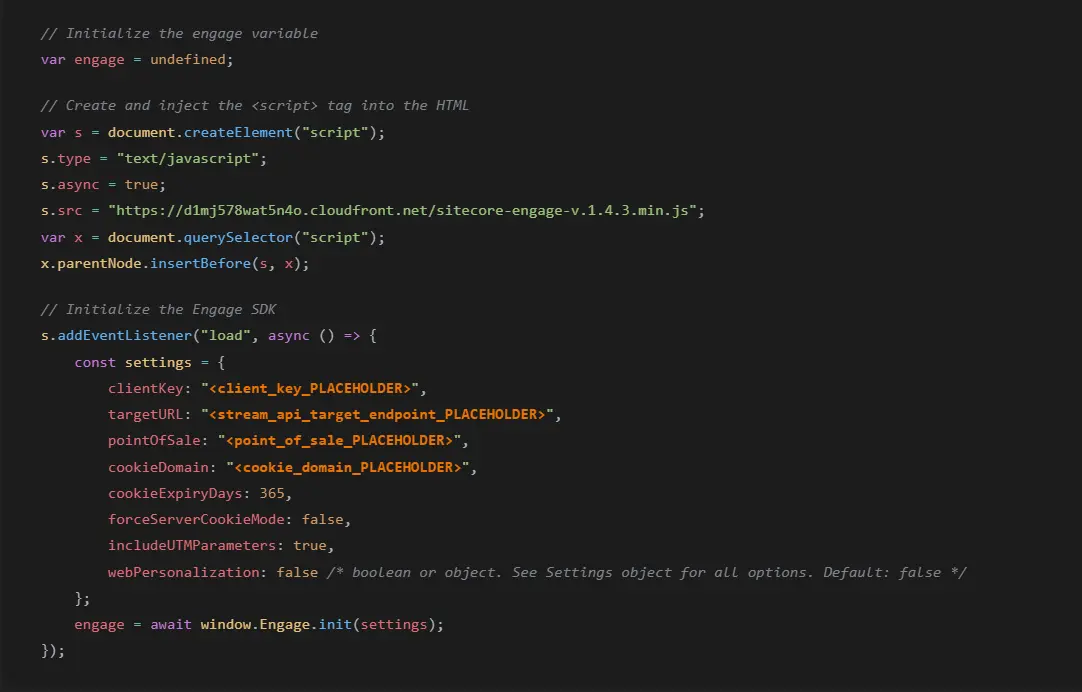
Let’s Get a Quick Overview on Running the Engage SDK Function
The Engage SDK enables setting up server-side tracking; this code helps initialize the SDK with configuration setting and capturing campaign parameters. It creates a server instance so the data can be tracked smoothly at backend. At every request the cookies generated helps the server identify and manage visitors and ensures customer data is captured before the page renders. The tracking code runs seamlessly on the server side and keeps the UI unaffected; it helps the engagement data to be processed in background while the page components load normally.
How To Choose the Right SDK with Architectural Considerations?
There are number of factors that decide which SDK best suits you:
1. Platform Strategy:
Cloud SDK is preferred by enterprises using XM cloud within Sitecore composable DXP architecture only while Engage SDK can work along different CMS platforms which want to integrate Sitecore CDP and personalize.
2. Flexible Requirements:
Cloud SDK is flexible for unified digital ecosystems in Sitecore that manages content, data and personalization together while Engage SDK works best for hybrid environments for multiple platforms and applications.
3. Digital Transformation Stage:
Cloud SDK is ideal for organizations that implement full DXP strategy with integrated Sitecore services while Engage SDK works best for organizations that deploy only engagement layer before adopting full DXP platform.
4. Experience Architecture:
Cloud SDK supports composable architecture with deep integration with Sitecore services while Engage SDK enables incremental adoption of Sitecore engagement layer without full platform.

Conclusion
With a clear overview of both the SDKs, we can say that both are equally important in enabling digital experiences. We understand that the Sitecore Cloud SDK supports enterprises that adopt a full Sitecore composable ecosystem, while the Sitecore Engage SDK enables a flexible engagement layer for customer data and personalization.
If you are an enterprise who wants to select the right SDK for your business, it requires evaluating platform architecture, integration preferences, and long run digital strategy. When a brand chooses the right implementation approach, enterprises can create scalable digital environments that help brands deliver personalized experiences across every customer touch point.
Techxot delivers vendor neutral digital experience consulting to propose architectures and strategies that drive measurable outcomes and not just platform implementations. Book your architecture advisory session with Techxot today!