
Introduction
Are you one of many who are trying to thrive on unsupported Umbraco versions?
Facing security vulnerabilities, fear of losing data, and having your third-part packages just stopped receiving new updates. If yes, then you need a reliable Umbraco solution provider.
With Techxot’s proven expertise in multiple industries, we define safe migration approaches, use proven frameworks for data protection, media and SEO and provide cloud-ready Umbraco solutions worldwide.
At Techxot, we have helped 30+ clients to unlock Umbraco superpowers by implementing tailored, flexible, scalable and performance driven solutions and combining deep expertise with experience and strategy to help enterprises build future ready digital experiences.
Now let’s get back to our core migration journey. After planning and setting up both environments, it was time for the real challenge, moving the actual content, media, templates, and data from Umbraco v8 to Umbraco v13 (LTS).
This is where we spent most of our effort; dealing with uSync migrations, data type mismatches, JSON issues, and a few unexpected bugs.
Here’s how our core migration phase unfolded
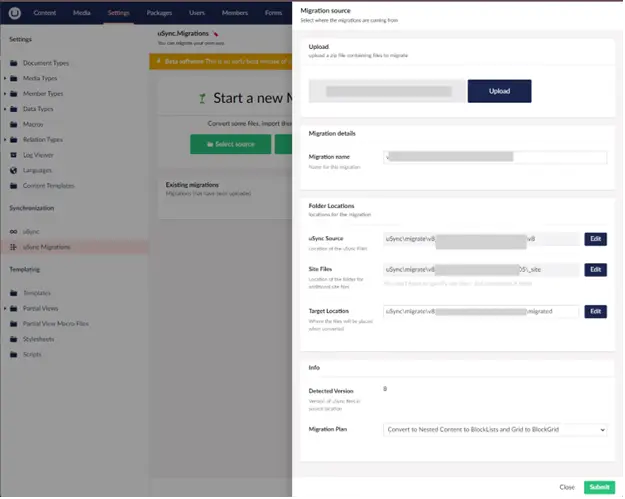
1. Installing the uSync Migration Packer
We started by installing the uSync Migration Packer package in our v8 project.
This tool lets you export all data types, document types, templates, and content in a format that’s compatible with v13.Once installed, we:- Generated a full uSync export package (.zip)
– Verified that the packer included all schema elements (especially nested content) This step gave us the foundation for actual core migration.
2. Exporting from Umbraco v8 and importing into Umbraco v13
Next, we moved the exported .zip into the new v13 project and ran the uSync import process.- Umbraco automatically recreated document types, templates, and data structures
– We validated imported content via the Backoffice
– Some complex property editors (like Nested Content) required manual reviewThis step successfully brought our site’s backbone into v13.
3. Converting Nested Content → Block List
One of the biggest changes between Umbraco v8 and v13 is the move from Nested Content to Block List Editor.
We used the uSync Migrator feature to convert all Nested Content data types into Block Lists automatically.However, this caused some property-level mismatches:
– The underlying JSON structure changed
– Linked content references broke (since the datatype changed)
So, while it automated most conversions, it also triggered the next set of fixes.
4. Fixing JSON Mismatches with a Custom Controller
After conversion, some pages didn’t render correctly because the JSON stored in the database didn’t match the new Block List schema.- Read and parse legacy JSON
– Adjust property names and GUID references
– Rewrite the structure to match Block List requirementsThese are some of the JSON structure codes from the core migration project:
1. Nested Content
{"contentTypes":[{"ncAlias":"contentModule","ncTabAlias":"Content","nameTemplate":"Content"},{"ncAlias":"formModule","ncTabAlias":"Content","nameTemplate":"Form Module"},{"ncAlias":"imageHeaderModule","ncTabAlias":"Content","nameTemplate":"Image Header - {{ title }}"},{"ncAlias":"promoTileRowSmallModule","ncTabAlias":"Content","nameTemplate":"Promo Tile Row Small - {{ title }}"},{"ncAlias":"promoTileRowLargeModule","ncTabAlias":"Content","nameTemplate":"Promo Tile Row Large"},{"ncAlias":"promoTileRowMediumModule","ncTabAlias":"Content","nameTemplate":"Promo Tile Row Medium - {{ title }}"},{"ncAlias":"pageIntroTextModule","ncTabAlias":"Content","nameTemplate":"Page Intro Text - {{ title }}"},{"ncAlias":"imageModule","ncTabAlias":"Content","nameTemplate":"Image"},{"ncAlias":"accordionModule","ncTabAlias":"Content","nameTemplate":"Accordion"},{"ncAlias":"quickEnquiryFormModule","ncTabAlias":"Content","nameTemplate":"Quick Enquiry Form - {{ title }}"},{"ncAlias":"facebookFeedModule","ncTabAlias":"Content","nameTemplate":"Facebook Feed"},{"ncAlias":"weatherZoneModule","ncTabAlias":"Content","nameTemplate":"Weather Zone"},{"ncAlias":"stormTrackerModule","ncTabAlias":"Content","nameTemplate":"Storm Tracker"},{"ncAlias":"payMyBillFormModule","ncTabAlias":"Content","nameTemplate":"Pay My Bill Form"},{"ncAlias":"payMyBillResultsModule","ncTabAlias":"Content","nameTemplate":"Pay My Bill Results"}],"confirmDeletes":true,"showIcons":true,"hideLabel":false}All fields are flatNo separation between content and layout
2. Block List
{"layout":{"Umbraco.BlockList":[{"contentUdi":"umb://element/7dc0d4c6c6c64730aa5f15b9358e6ee7","settingsUdi":null}]},"contentData":[{"udi":"umb://element/7dc0d4c6c6c64730aa5f15b9358e6ee7","contentTypeKey":"a8d1b9fc-d7b8-415d-8b27-765e3cd823e2","key":"7dc0d4c6-c6c6-4730-aa5f-15b9358e6ee7","image":"umb://media/a1b0bdfc0c99467ab3ae577c75646446","imageAltText":"News","title":" Latest News ","link":[]}],"settingsData":[]}layout.Umbraco.BlockList controls ordering
contentData stores the actual block content
Multiple block types coexist cleanly
Layout and content are decoupled
This script saved hours of manual editing and ensured data integrity across hundreds of content items.
5. Migrating Media and Updating Media Pickers
Media migration was another tricky area.
Umbraco v8 media files were under static folder or in our case Media folder at project root
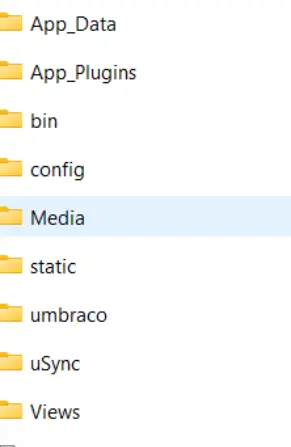
whereas in v13 all assets are inside wwwroot directory:
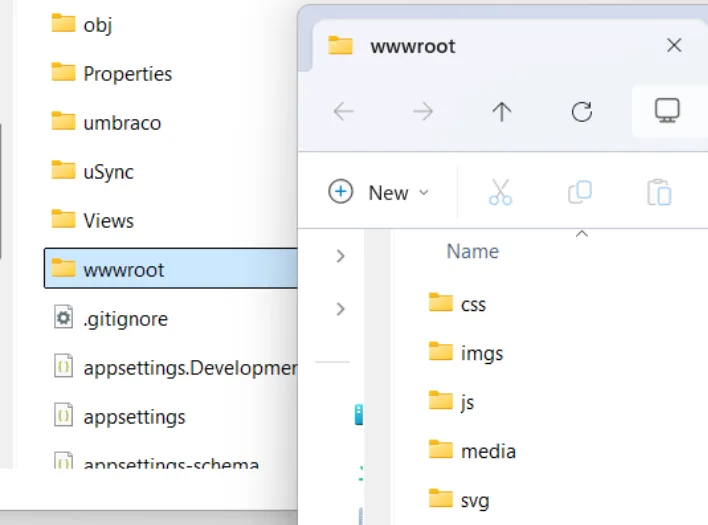
Because of this change, media URLs broke, crops didn’t regenerate properly, and some assets lost references after importing.We resolved this by:
– Moving all media files into the new /wwwroot/media/ folder
– Updating appsettings.json so Umbraco correctly pointed to the new media path
– Clearing and rebuilding image crops to fix caching issues
Additionally:
– Replaced all Legacy Media Picker fields with Media Picker 3
– Fixed references where picker value formats had changed
After these adjustments, all media links, crops, and previews rendered perfectly again, both in the backoffice and on the live site.
6. Migrating Forms
During migration, Umbraco Forms properties were automatically converted into simple “Label” fields, losing their functionality.
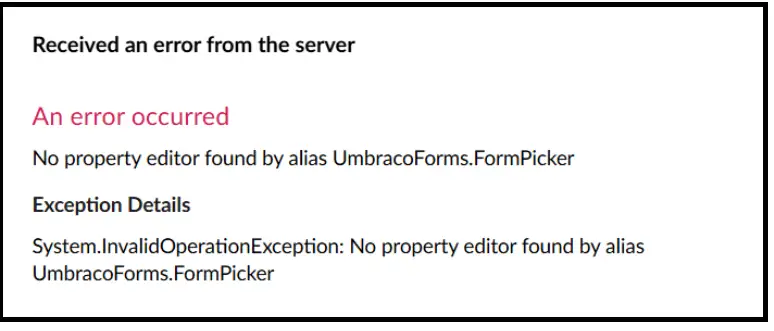
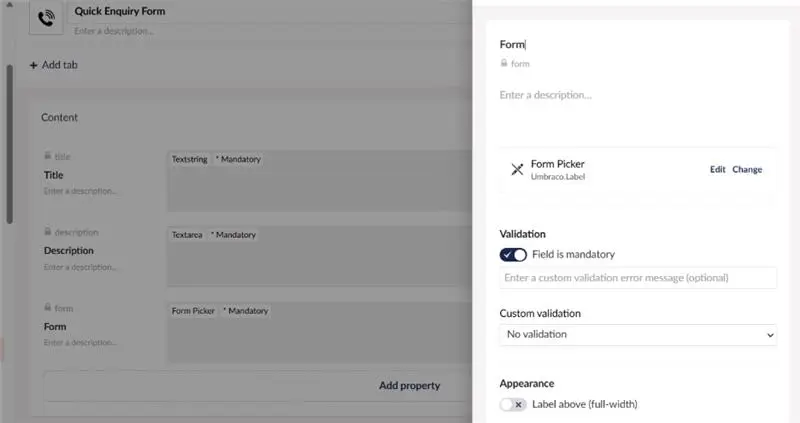
We fixed this by:
– Replacing old form-related datatypes with FormPicker
– Re-linking form GUIDs manually
– Verifying that submission endpoints and templates workedOnce done, all forms were back to being functional.
7. Migrating Templates, Views & Partial Views
Templates were another area that needed manual attention.Razor syntax had subtle differences in .NET Core (v13) compared to .NET Framework (v8).
We:
– Updated all layouts and partials to match the new structure
– Replaced old namespaces with the new namespace syntaxSome of the common examples are
Umbraco v8 | Umbraco v13 |
Umbraco.Web | Umbraco.Cms.Web.Common |
Umbraco.Web.Mvc | Umbraco.Cms.Web.Common.Controllers |
Umbraco.Web.Models | Umbraco.Cms.Core.Models.PublishedContent |
Umbraco.Core | Umbraco.Cms.Core |
Results We Achieved
By the end of this phase:
– All content types, templates, and media were successfully migrated
– All broken JSON and picker issues were fixed
– The new site was structurally identical to the old one but built on a modern, faster, cleaner foundation
It wasn’t easy, but seeing content render perfectly in Umbraco v13 was the best reward for weeks of effort.
Why Techxot Approach Work?
We started with auditing, custom strategy, choosing what rebuilds and stays before core migration begins. Trusting and choosing Techxot as an Umbraco silver partner for developing and deploying cloud ready implementation that solve migration challenges like handling complex data structures, moving to better versions, converting legacy nested content to blocks, optimizing and configurating core migration and post migration issues efficiently without your business operations disruption. The approach balanced all the above and smartly executed focusing on outcomes and delivering customized solutions for the enterprises to build digital experience transformation.
Techxot doesn’t just upgrade but becomes strategic investors to build cloud-ready solutions, optimize performance and become long-term growth partners to future proof your digital experiences.
Next up, wait for part 4th: Migration between Umbraco v8 and v13 Migrating Content.