
1. Introduction
Managing SEO on a small Umbraco website isn’t that complex. The real challenges begin with website pages that are thousands, are multilingual, have changed URL structure, different editors, and multiple domains. This can make SEO look like a collection of manual tasks rather than SEO being a foundational part of your Umbraco CMS.
Umbraco SEO toolkit provides tools within Umbraco for managing several SEO activities like metadata, robots.txt, scripts, sitemaps, redirects, missing pages, and site audits.
2. What is Umbraco SEO Toolkit?
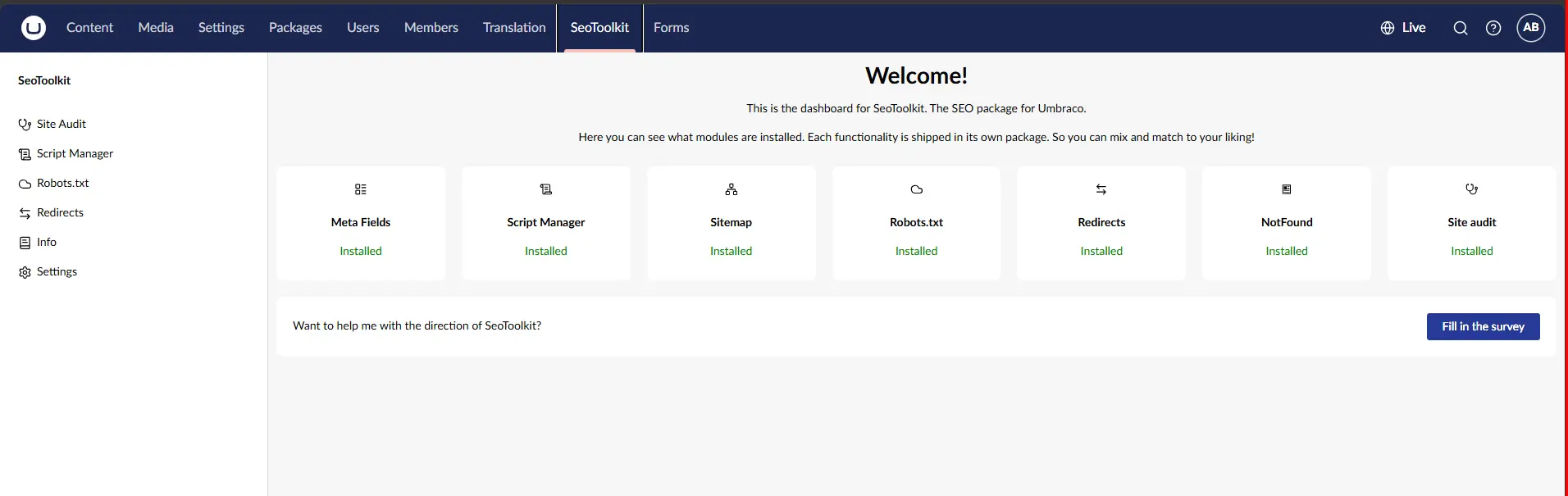
Umbraco SEO toolkit is a package within Umbraco. The toolkit adopts its functionality according to your project requirements and doesn’t need to implement every feature available.
dotnet add package SeoToolkit.Umbraco
Umbraco SEO toolkit includes capabilities like:
Meta Fields
Robots.txt
Script Manager
Sitemap
Redirects
NotFound
Site Audit
The goal for the enterprise projects is to clearly identify where SEO responsibility is necessary and where it adds the maximum value.
3. How does SEO Toolkit manage Meta Fields?
Meta fields help Umbraco teams with managing crucial page level SEO and social metadata for their Umbraco CMS projects.
Meta fields supports:
SEO title and description
Open Graph title, description, and image
Canonical URL
Metadata uses existing content fields, while allowing editors to manually override values when custom optimization is needed.
For example:
If a product page has product information, the meta fields can automatically derive metadata.
On the contrary, a campaign page may require using manually optimized values. This can strike a perfect balance between editorial and automation controls.
4. How does SEO Toolkit manage Robots.txt?
The Robots.txt feature allows teams to manage the website's robots.txt configuration through Umbraco.
If content is changed or updated, robot.txt changes should be presented within an enterprise SEO governance process. Because incorrect directives can cease search engines from accessing important website data. Since SEO demands crawler access to be treated as a controlled technical SEO configuration, robot.txt essentially becomes an important SEO feature.
5. What does Script Manager do?
Script Manager allows teams to manage some of the most common scripts centrally in Umbraco websites.
The scripts may include:
Google Tag Manager
Google Analytics
Hotjar
Custom scripts
Using the scrip manager potentially reduces the unnecessary template changes when tracking or third-party script addition.
Script governance is important because additional scripts can affect performance, privacy, security, and page behavior.
6. How does To Manage XML Sitemaps?
The sitemap.xml provides optimal support to multiple domains and languages. Umbraco teams configure sitemap data such as alternate language pages, last-modified values, change frequency, priority, and what content should appear.
For enterprise Umbraco website the flow of relationship is straightforward:
Content
URLs
Sitemap
Search discovery
A sitemap enables search engines to discover the URLs on the website for crawling.
7. How To Handle Redirects?
Redirects management through SEO toolkit is important when an enterprise Umbraco website undergoes migration or changes its information architecture.
A simple URL change can seriously affect organic traffic, backlinks, internal linking, and mainly search visibility.
A migration should therefore connect:
Old URL
Redirect
New URL
Canonical URL
Sitemap
Internal links
The SEO toolkit can prominently support redirect management processes, but when it comes to migration, it requires URL mapping, validation, crawling test, and post launch monitoring.
8. What is the NotFound feature?
The NotFound feature helps Umbraco teams manage those URLs which do not resolve the available content.
For websites that are larger, missing URLs are the results of deleted pages, outdated links, migration changes, or incorrect URLs.
Building an effective 404 handling strategy can work along with the redirects. This ensures the valuable URLs are not lost.
9. How does Site Audit help Umbraco teams?
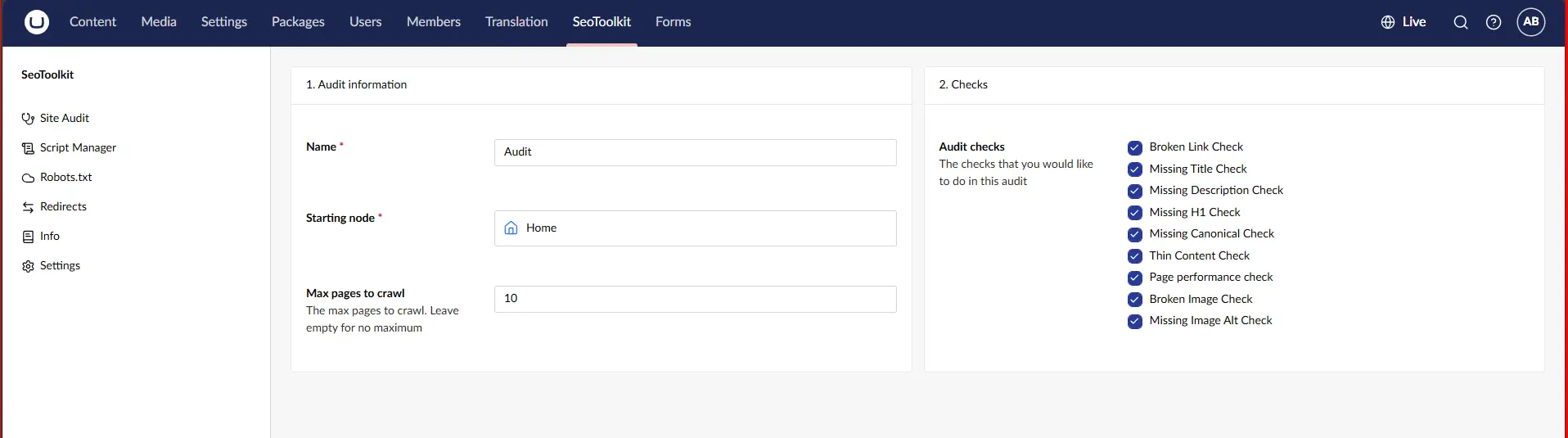
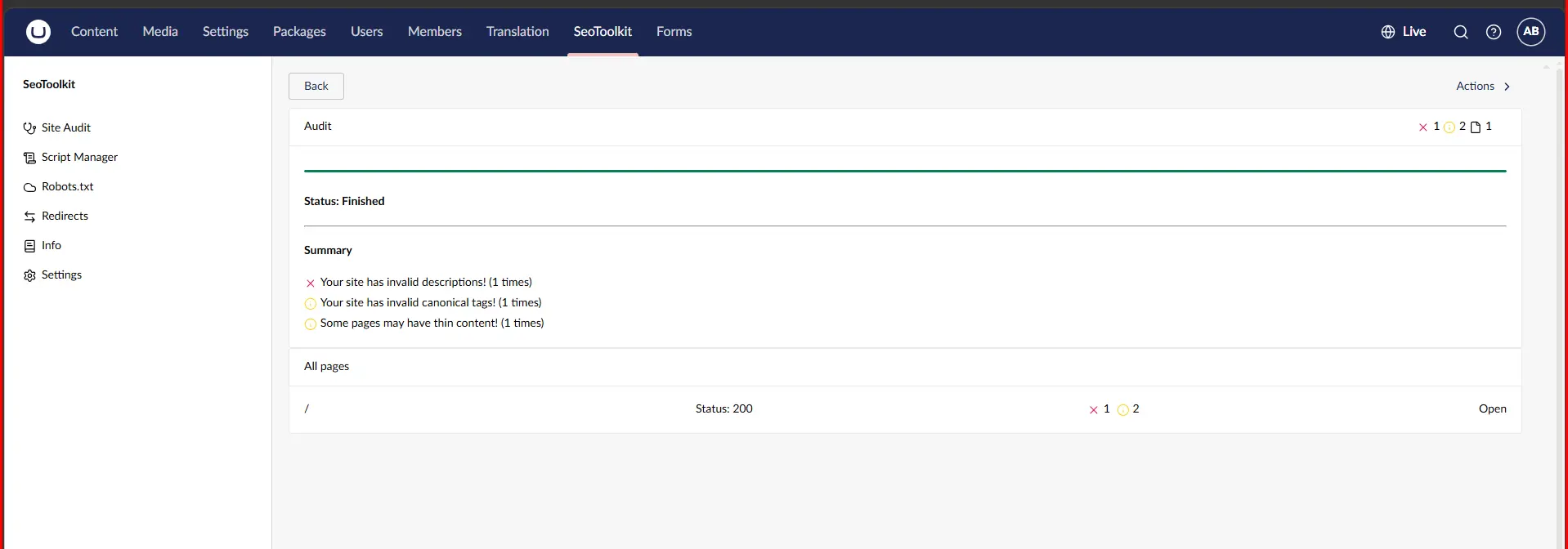
Site audit is a process which helps teams identify potential bottlenecks that can affect the website quality, usability, and SEO.
This feature is useful for websites that have hundreds of pages, where technical issues exist across these pages even after the underlying templates are correctly implemented. Continuous auditing therefore becomes a part of an ongoing technical SEO workflow.
10. How can SEO Toolkit be extended?
The Umbraco SEO toolkit is packed with several extension packages for those websites that require more than just the standard configuration.
General
The general extension packages framework allows Umbraco developers to customize or extend the original SEO toolkit features for their project-specific needs.
Services
The services extension enables teams to work with SEO toolkit features and integrate it with your existing Umbraco components.
Notifications
The notification extension allows developers to work around the SEO toolkit operations, like sitemap generation, metadata processing, and enabling teams to develop project-specific logics.
AI
The AI extension supports AI-assisted SEO metadata process, which helps developers in repetitive metadata creation for larger content inventories.
This AI-generated metadata is reviewed for accuracy, brand alignment, relevance, and search intent. AI should not eliminate editorial governance; it should just improvise the workflows.
Headless Setup
Headless Umbraco acts like another SEO layer, since content is managed in Umbraco but rendered in separate frontend.
For enterprise Umbraco website the flow of relationship becomes:
Umbraco
Content delivery
Frontend
Rendered HTML
Search crawler
The SEO toolkit supports Umbraco side, but developers should verify the SEO information is accurately delivered and rendered at the frontend.
11. Key Takeaways
SEO toolkit centralized technical SEO in Umbraco.
It supports selective implementation through a modular structure.
SEO toolkit connects metadata, sitemaps, redirects and robot.txt.
Ongoing maintenance can be optimized with NotFound and Site Audits.
Extension provided added support to complex Umbraco architecture to run seamlessly.
Meta data workflows can be accelerated with AI.
Headless setups require verified frontend validation.
12. Conclusion: Where Does SEO Toolkit Fit in the Enterprise Umbraco?
SEO toolkit should not replace an enterprise SEO strategy. Its value is providing a structured technical layer for managing SEO operations within Umbraco.
The strongest approach is to first define how metadata, URLs, redirects, sitemaps, crawler access, scripts, and audits should work. SEO toolkit can then be configured around those requirements.
Enterprise SEO is not about having more tools. It is about giving every SEO signal a clear rule, owner, and reliable technical implementation.