
Introduction
Over the last few years, the Sitecore platform has developed far beyond a traditional content management system. What once focused primarily on managing digital experiences now includes AI-generated content creation, smart automation, personalized applications, and agent-driven workflows. As businesses grow, they need a platform that can scale, integrate with their present systems, and support this digital era.
Sitecore Studio fulfils this need by offering a unified environment for extending the SitecoreAI platform. It allows organizations to create AI-powered solutions, connect with third-party tools, and customize digital experiences while maintaining governance and scalability.
This blog explains what Sitecore Studio is, its architecture, key features, benefits, implementation approach, pricing considerations, and best practices.
What is Sitecore Studio?
Sitecore Studio is SitecoreAI's integrated extensibility framework that provides companies, partners, and developers with the workspaces, SDKs, APIs, and development tools they need to build AI agents, develop unique apps, integrate external systems, and expand SitecoreAI's capabilities.
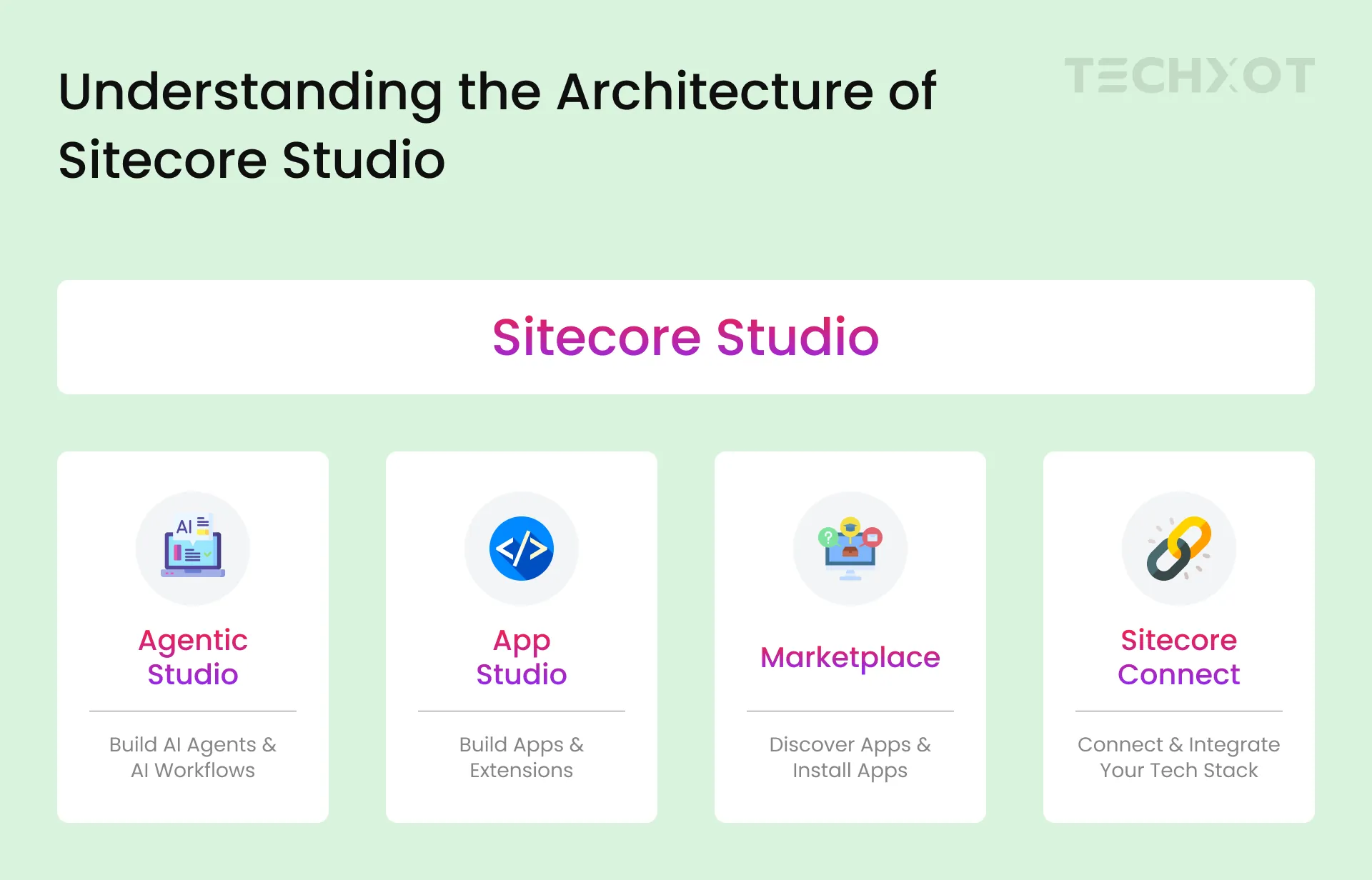
It is the basis for extensibility throughout the Sitecore ecosystem rather than a stand-alone solution. By combining Agentic Studio, App Studio, and the Marketplace into one platform, it enables businesses to create once, reuse features across several SitecoreAI products, and uphold uniform security and governance.
Why Sitecore Studio Matters?
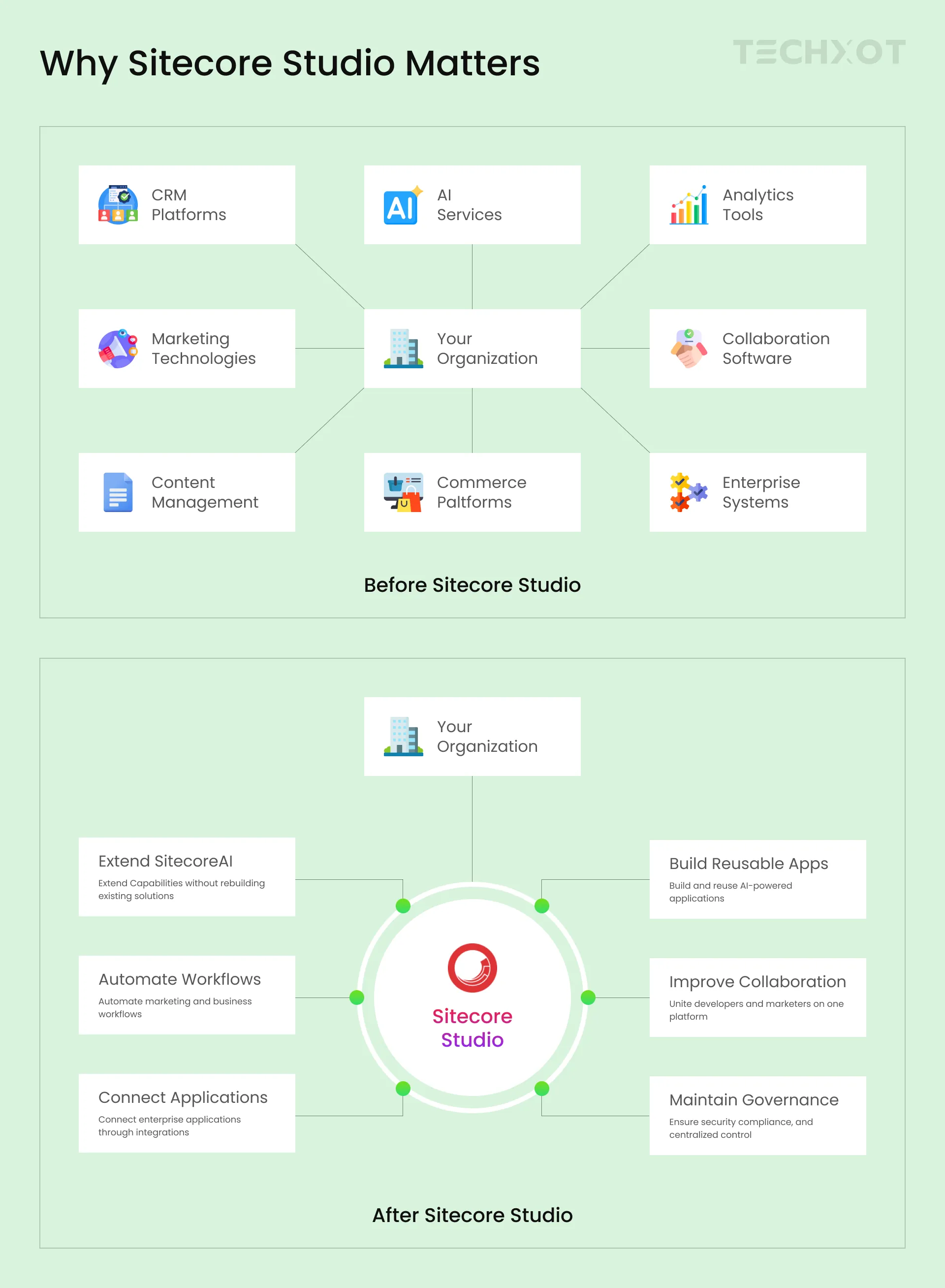
Let’s look into how businesses usually handle digital experience operations both before and after implementing it in order to get a better understanding of its benefits. It integrates AI, applications, integrations, and governance into a single, unified environment, as seen in the figure below.
Inside Sitecore Studio: Architecture and Core Workspaces
1. Agentic Studio
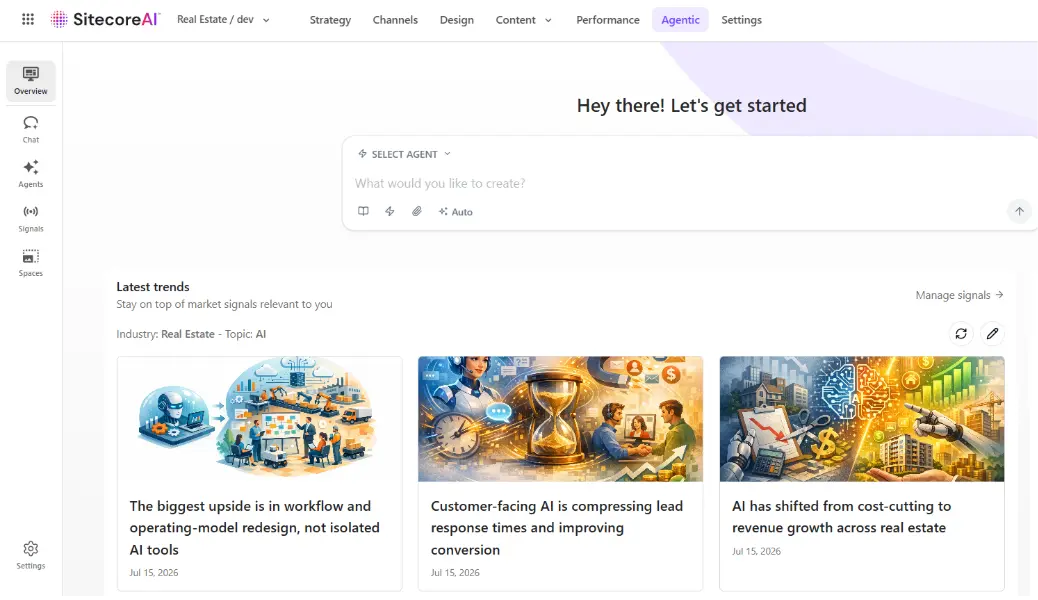
The Sitecore Studio AI agent development workspace is called Agentic Studio. It allows businesses to create, set up, and oversee advanced AI agents that automate business and marketing procedures. To make sure AI-driven tasks are in line with company goals and best practices guidelines, teams are able to organize agentic workflows, specify human approval procedures, work together in shared workspaces, and track agent performance.
Key Capabilities:
Build and configure AI agents
Design agentic workflows for business processes
Collaborate through shared Spaces
Configure human approval and governance workflows
Monitor agent performance with Signals and insights
Automate repetitive marketing and operational tasks
2. App Studio
The Sitecore Studio application development workspace is called App Studio. It makes it possible for developers and technology partners to create unique apps, extensions, and integrations that increase the SitecoreAI platform's functionality. Teams may link third-party systems, develop reusable solutions, and publish apps to the Sitecore Marketplace with the help of APIs, SDKs, Model Context Protocol (MCP) support, and developer tools.
Key Capabilities:
Build custom applications and business tools
Develop extensions and plugins
Integrate external platforms and services using APIs and MCP
Create reusable AI-powered solutions
Publish applications to the Sitecore Marketplace
Extend SitecoreAI with custom functionality

3. Marketplace
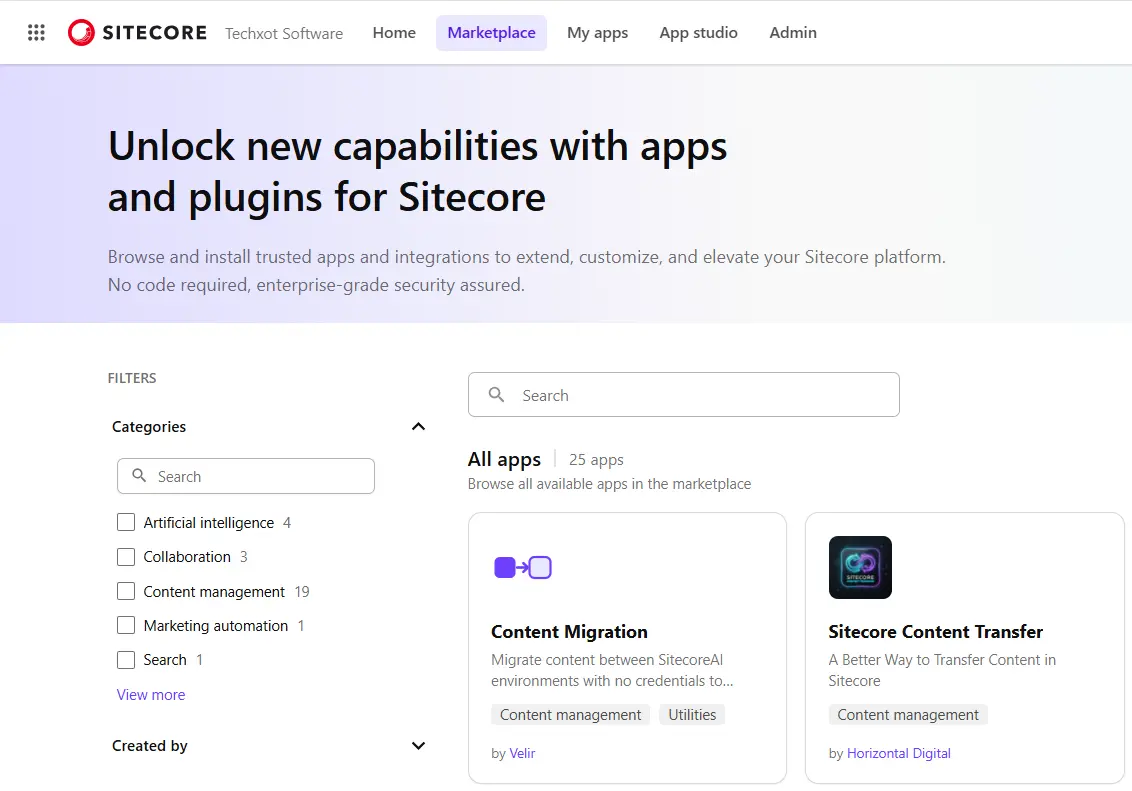
Marketers can find, install, and manage reliable apps, connectors, and AI agents created by Sitecore and its partners via Marketplace, which functions as SitecoreAI's application store. Additionally, it gives partners and developers a platform to publish and distribute their own solutions, providing a safe, low-code method of extending SitecoreAI and enhancing the functionality of already-existing Sitecore products.
Key Capabilities:
Discover AI-powered applications
Install trusted extensions
Manage installed applications
Access Sitecore and partner solutions
Extend SitecoreAI without custom development
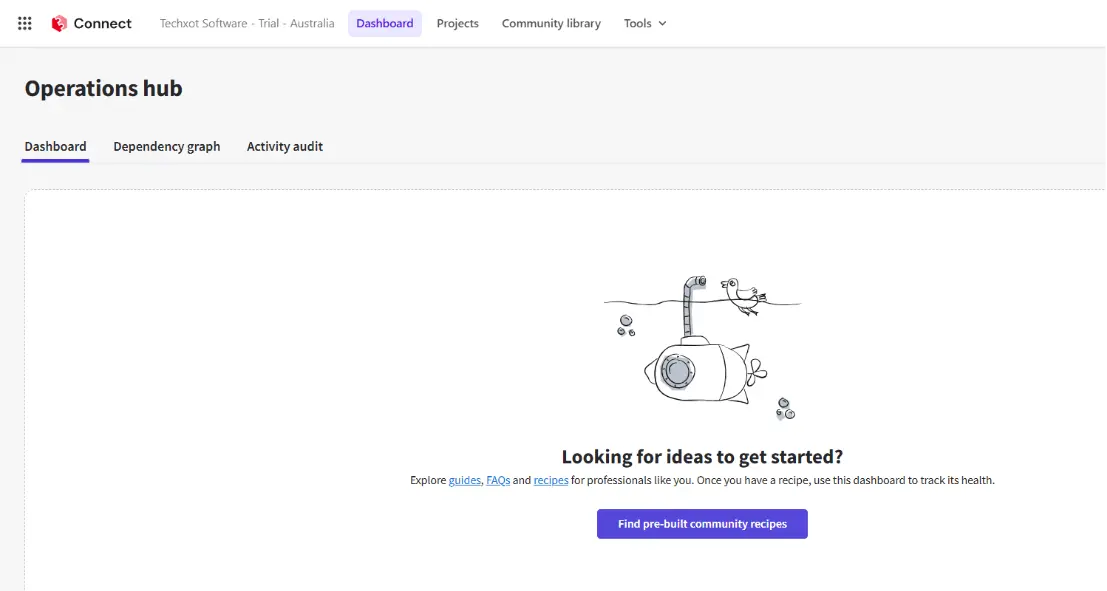
4. Sitecore Connect
Businesses can use Sitecore Connect, an integration workspace, to integrate SitecoreAI with any third-party tools. It offers a library of built-in connectors and ready-to-use solutions, letting teams create new integrations. By automating data transfer and workflows across marketing, CRM, analytics, collaboration, and other business platforms, Sitecore Connect helps businesses create a unified digital environment with little development work.
Key Capabilities:
Connect SitecoreAI with third-party platforms
Use prebuilt connectors and integration recipes
Build custom integrations and workflows
Automate data synchronization across systems
Extend integrations using APIs and low-code capabilities
Key Features and Benefits of Sitecore Studio
AI development, application extensibility, enterprise connectivity, and governance are all combined into one platform with the help of this studio. Rather than depending on many technologies to develop AI agents, develop applications, or connect other systems, organizations can handle everything from a single, integrated workspace. This strategy speeds up development, promotes innovation, and guarantees that every solution aligns with corporate security and governance regulations.
Some of its primary features are:
Features | How It Benefits Your Organization |
Unified extensibility platform | Build, manage, and extend SitecoreAI from a centralized workspace, reducing complexity and improving collaboration. |
Agentic Studio | Automate repetitive business and marketing tasks with intelligent workflows and AI agents with human oversight. |
App Studio | Create unique applications, extensions, and business solutions based on the requirements of your company. |
Marketplace | To speed up implementation, find, implement, and oversee partner-built solutions and reliable apps. |
APIs, SDKs, & MCP support | Integrate SitecoreAI with enterprise systems, third-party applications, and AI assistants for connected digital experiences. |
Enterprise governance | Apply security rules, approval procedures, and compliance controls to all AI-powered apps. |
Role-based access oversight | While preserving essential assets, grant the proper permissions to developers, marketers, administrators, and partners. |
Native SitecoreAI integration | Extend existing SitecoreAI products without disrupting established workflows or user experiences. |
How Can You Use Sitecore Studio to Optimize Content Management?
By integrating AI-powered automation, custom apps, and business connectivity into a single, unified platform, companies can use Studio to enhance content management.
Using AI-powered agents and workflows to simplify content generation and evaluation.
Reducing approval processes using role-based governance and human approval workflows.
Linking external systems like CRM, DAM, analytics, and marketing platforms by putting Sitecore Connect into practice.
Developing bespoke apps that meet specific company needs and content operations.
Enhancing teamwork by giving administrators, developers, and marketers the same workspace.
Using Marketplace applications to expand Sitecore's capabilities rather than depending on custom development.
Best Practices for Using Sitecore Studio
To maximize the value, organizations should follow a few best practices.
Before implementing AI throughout the entire company, start with a small use case.
To minimize custom development, use Marketplace applications whenever feasible.
Instead of creating one-time automations, create reusable AI agents and workflows.
Role-based permissions and governance are used in secure integrations.
Set up workflows for human approval for content that is essential to the business.
Workflows should be routinely monitored, and AI agents should be optimized in response to business input.
Instead of creating isolated solutions, use APIs, SDKs, and MCP to create scalable integrations.
Real-world Use Cases
AI-driven content production
Automation of marketing workflow
Assistants in customer service
Agents that endorse products
Integrations with CRM
DAM synchronization
Knowledge helpers for enterprises
Automation of content approval
How Techxot Helps Organizations with Sitecore Studio
At Techxot, we have found that organizations adopting AI-first architectures gets benefitted most when they centralize automation, integrations, and governance within a unified platform like Sitecore Studio. So, we help businesses in properly implementing and expand Sitecore to create scalable, AI-driven digital experiences. Our Sitecore specialists provide solutions that are suited to your company's requirements, from implementation and modification to enterprise integrations.
Our expertise includes:
Sitecore Studio implementation and consulting
Custom AI agent and application development
Marketplace and App Studio solutions
Sitecore Connect integrations
API, SDK, and MCP implementation
Ongoing optimization and support
Key Takeaways
Sitecore Studio extends SitecoreAI.
Includes Agentic Studio, App Studio, Marketplace, and Connect.
Supports AI-powered automation.
Enables reusable enterprise applications.
Simplifies integrations.
Centralized governance improves security.
Accelerates digital transformation.
Conclusion
We may infer from the article above that companies can create, expand, and manage AI-powered digital experiences with the help of Sitecore Studio, the only extensibility platform in the SitecoreAI ecosystem. Teams can grow more quickly while maintaining security, scalability, and operational efficacy by incorporating AI agents, custom apps, business connectors, and centralized governance. Sitecore Studio offers flexibility to handle changing business requirements and ready-to-go content operations as companies continue to adopt technologies powered by AI.
Now that you have a better grasp of Sitecore Studio’s features, we hope you can see why it is becoming an essential part of modern Sitecore configurations. At Techxot, we help you create intelligent, connected, and scalable digital experience solutions if you intend to modify or use Sitecore Studio.